CineSmith
Sightline  ·  Mac, PC, iPad

The overhead you work on, upgraded.

Same instrument: a plan at real size, the kit at its footprint, lettered cameras, your own .hcw files. Drag Marcus along his walk below and watch the shot change while the camera stays exactly where you put it.
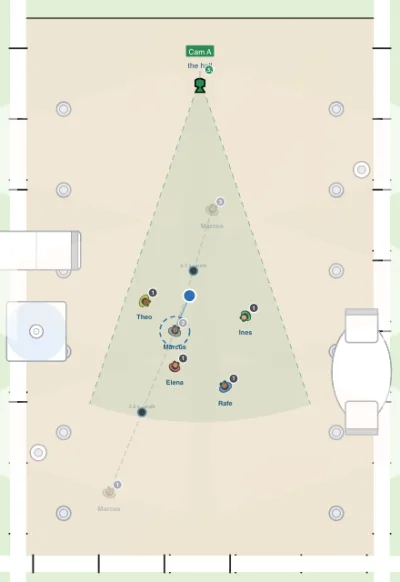
The overhead: a hall with Cam A at the top and its coverage drawn down the room, four people standing in the middle of it, and Marcus standing on mark 2 with marks 1 and 3 ghosted at either end of his walk and the seconds written on each run.
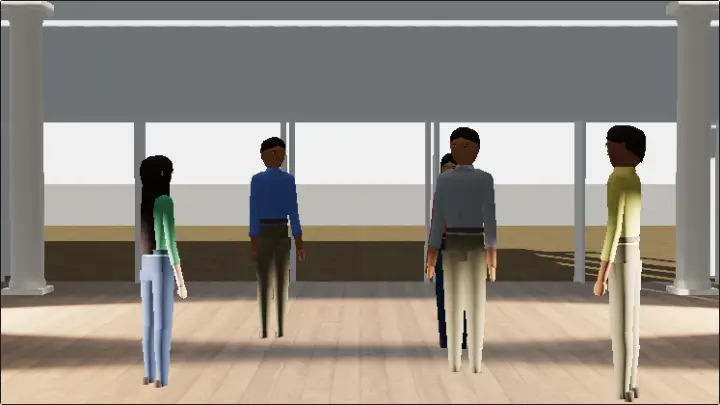
Looking down Cam A: the hall on a 35mm, the four of them standing in it, and Marcus level with them where mark 2 puts him.
1 2 3

Marcus · Mark 2 of 3 · 3.78 s

Both halves came out of Sightline. Marcus has three marks and a clock of his own, the four of them are standing at their real heights, and the camera is locked off at the height it would really sit at. Slow his walk down and nothing else on that plan moves. Neither half was drawn by hand for the website.

Free for the first fifty  ·  Works offline  ·  Opens and saves Shot Designer files


Two cameras, the same moment.

The demo at the top is one camera and a walk. This is the other way round: one moment, and the two cameras you are choosing between. Select either, press V, and you are looking down it, with that body and that glass, in the room lit for the time of day.

Sightline running: on the left the overhead of a beach house with Cam A, Cam C and Cam D lettered and Marcus’s walk keyed 1, 2, 3; on the right the viewfinder on Cam A showing the lit room wide with Elena standing by the sofa, the ARRI ALEXA Mini 2.8K 16:9 and 25mm under it and the row of focals.
Cam A · the room · ALEXA Mini 2.8K 16:9, 25mm
The same scene a moment later: Cam D is selected on the overhead and the viewfinder shows Marcus standing in the doorway with the deck, the sand and the water behind him.
Cam D · out to the water · the same plan, the same moment, a different camera

Three things you stop doing.

Not new ways to draw a plan. The parts of the job that cost you an evening.

Guessing what the lens sees

Press V on any camera and look through it: that body, that glass, from that height, in the room lit for day or night. You find out the 35 does not hold both of them at the desk, not on the floor with the crew standing there.

Re-blocking everybody to change one person

Every actor and every camera has its own marks, numbered 1, 2, 3 like key frames. Slow one walk and nothing else on the page moves, and the camera keeps the timing you gave it while the action changes around it.

Rebuilding it all somewhere else

Storyboards with the overhead for that moment beside every frame, shot cards, the blocking list for the AD, the shot list as a spreadsheet. All of it out of the plan you already drew, as paper.


Everything else it does.

A plan you can look through. Everything at real size, every camera a real body on a real lens.

Real size

A fifteen-foot car is fifteen feet on the grid. Walls, doors and windows measured; trace them off a floorplan photo if you have one.

The lens you will put on

40 lens sets and 419 focal lengths, each set holding only the focals it really has, on 37 bodies and 10 film formats across 77 recording modes. It says when the glass will not cover the sensor.

Lit, day or night

One switch. Night is a dark sky and a moon where the sun was, and the practicals you put on the plan light the frame.

Fly it

W A S D fly the camera in the direction the lens is pointing. Press / and type or say “tighter”, “height five”, “night”.

Your Shot Designer files

It reads and writes .hcw in place. A library built over years opens untouched, and what you save here still opens anywhere else that reads it.

What comes out

Shot list, storyboards, beat board and shot cards as PDF. A CSV for the AD. Every scene at once.


Coming from Shot Designer.

Same instrument: an overhead you think a scene out on, the kit at its footprint, lettered cameras. The parts that fought you are the parts that changed.

Your library opens as it is

It reads and writes .hcw in place. Ten years of scenes open untouched, and a scene you save still opens in Shot Designer with its room, its cast and its cameras. The moves are the part that stays here.

One walk, one person

Slowing somebody down used to mean adding beats for everybody, and a fight was a million character points. Every actor and every camera now has its own marks.

The camera keeps its timing

Change the action and the dolly stays where you put it. In a shared beat bar the camera’s move broke every time the blocking did.

A real lens, from a real height

Press V on any camera and look through it: the body, the glass, the room lit for day or night. There was no way to do this at all.

It comes out as paper

Boards with the plan beside them, shot cards, the blocking list, the shot list as a spreadsheet. None of it rebuilt in another app.

The 2014 menus are gone

Camera track, blocking mode and templates are off the menus. A short grouped menu and a toolbar with words on it.

How the switch works

Blocking is marks, numbered like key frames.

The bar at the top of this page is the real one. Click where somebody walks and you get mark 1, mark 2, mark 3 along the plan, with the seconds each walk takes written on it, and the bar shows the marks of whoever is selected. The overhead plan is the timeline.

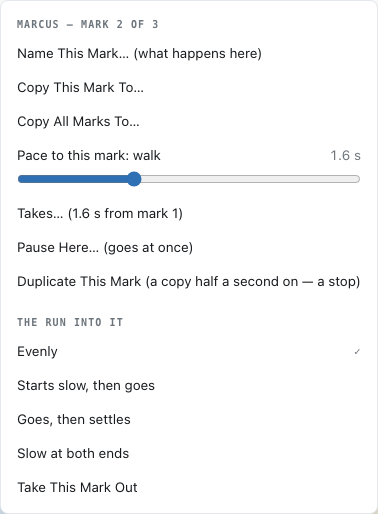
A mark’s window in Sightline: Marcus, mark 2 of 3. Name This Mark, Copy This Mark To, Copy All Marks To, Pace to this mark: walk, 1.6 s with a slider, Takes… 1.6 s from mark 1, Pause Here…, Duplicate This Mark, and the run into it: evenly, starts slow then goes, goes then settles, slow at both ends.
Click a mark: what it is called, how fast he gets there, how long he waits, how the walk eases in.

One set of marks per actor, and per camera

They do not share a clock. Marcus crossing the room does not move the camera, and slowing his walk leaves the dolly where it was.

Pace, or a number

A walk is worked out from the distance. Say it takes 1.6 seconds instead, or pause here, and everything after it moves up.

Press play

The figures walk it, the camera moves with them, and the viewfinder plays the shot at the same time.

Copy it to somebody else

The same marks on another actor, their own positions left alone. Out as a blocking list: what happens, mark by mark, per part.


The boards come out with the plan beside them.

Press Storyboard in the viewfinder and that frame is kept, at the mark it was taken on. The export puts the overhead for that moment next to every frame, so the page says where the camera was standing as well as what it saw.

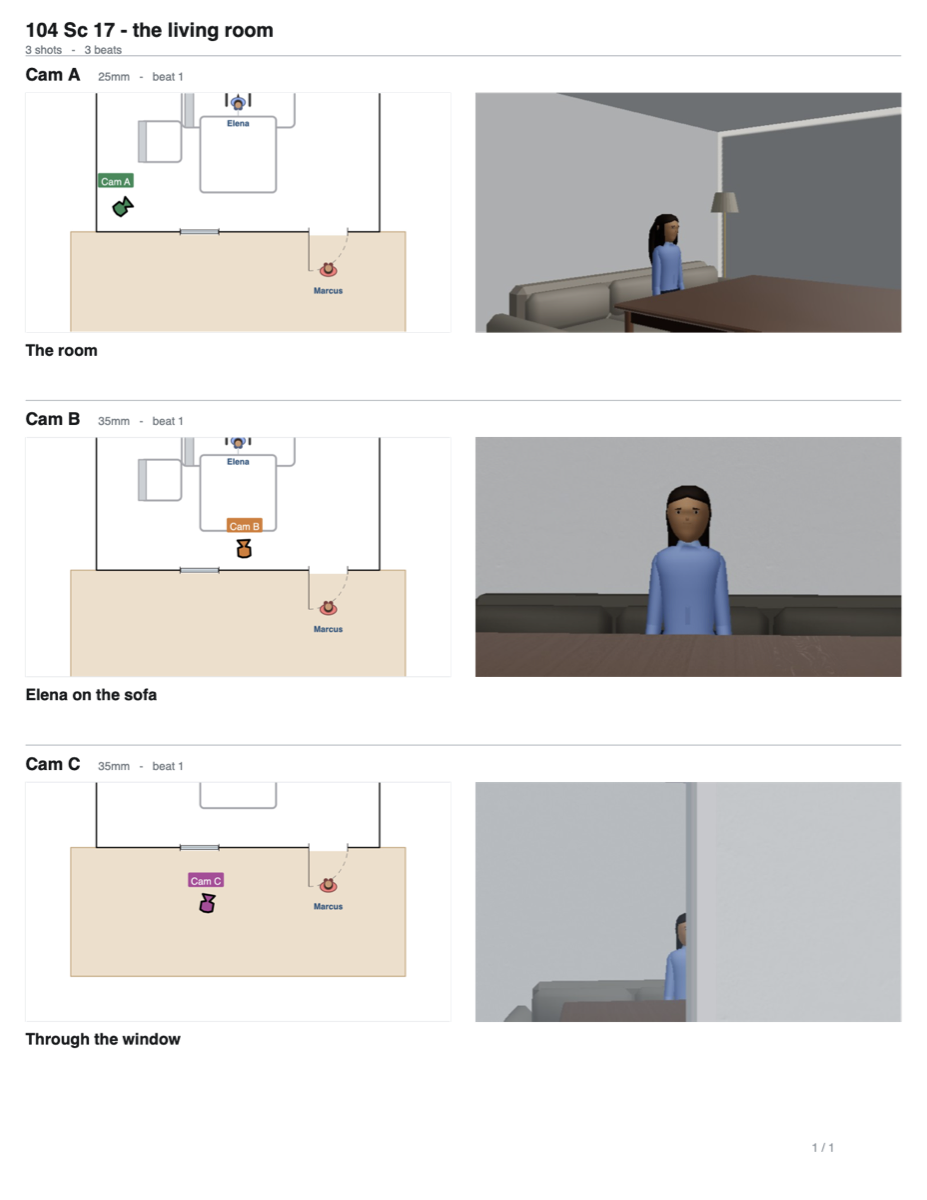
A page of the beat board PDF: the scene name at the top, then three rows, each with the overhead on the left and the frame from that camera on the right, the camera letter, the lens and the beat above the row and the shot's name under it.
A page of the beat board. Three to a sheet, the plan on the left and the frame on the right.

Every frame knows where it came from

The camera letter, the lens and the mark are above the row; the shot’s name is under it. Nobody has to work out which angle that drawing goes with.

Drawn for paper, not screenshotted

The overheads are redrawn at print size and every word is type, so it holds up when the director pinches into it on a phone or the AD prints it at the call.

The other sheets too

Shot cards one page per shot, the storyboards on their own paginated, the shot list as a CSV for the AD, the blocking list of what happens at each mark per part.

Or a picture

The same board as one tall PNG for a text message, and the plan on its own as PNG or SVG.


Sets you can stand in.

Draw one, bring one in, or scan the real place.

Drawn

Walls, doors, windows and furniture, at real size, with a ceiling if you want one. A set is a thing, not a layer in one scene: draw the house once and every scene shot in it follows it.

Built somewhere else

A set modelled in Blender, SketchUp or anything that writes a .glb: drop the file on the plan. It stands at real scale, measures itself and draws its own overhead. It goes back out to Blender or Unreal at true scale.

Scanned

A Gaussian splat off a phone (.splat, .ply, .spz) comes in as the room. It finds its own floor and up, cuts an overhead, and people stand in it.

Locations

A folder of scout photographs with the look written beside it, day and night. Frames from Frameline land here on their own.

The real ground and walls

Scanned surfaces underfoot and on the walls in the lit finder, so a floor reads as that floor.

The sun on the day

Paste the address, pick the date: the sun’s path rings the set an hour at a time. It prints as a sun map.

A Sightline plan with the sun’s day drawn round it: a compass, an amber arc from sunrise at 5:06 to sunset at 8:18, an hour tick for each hour, the sun at 4:30 with its light crossing the room.
The sun’s path round the set, and the light across it at the hour you shoot
Start free The Field Guide

Or just use it as an overhead.

If all you want is what Shot Designer gives you, that is all it has to be. Draw the room, put the cameras in, type the shot list, print it. It opens your old scenes and saves them back as .hcw, so nothing has to change the week you try it, and the rest of the page is there on the day you want it.


Josh operating from the dolly on a night exterior, the camera lined up on a lit house.
Who makes this

Josh Maas, a director of photography in Los Angeles, ICG Local 600. More than forty features in fifteen years, and ten of those years planned in Shot Designer. Sightline is the upgrade to that, not a replacement for it: the same overhead, the same lettered cameras, the same .hcw folder, with a lens you can look through and blocking that moves one person at a time.

ICG Local 600  ·  Los Angeles  ·  40+ features  ·  joshmaas.com