
CineSmith
Frameline  ·  iPhone

A director’s viewfinder that does the rest of the job.

It frames like the app you use now: your body, your glass, the real angle of view. Pick the frame you are delivering below and watch it carve the picture. What it takes off you is the hour afterwards: every frame files itself under the place you shot it, and the whole scout goes out as one link.

Free  ·  iPhone, iOS 18 or newer  ·  Built by a working DP, ICG Local 600
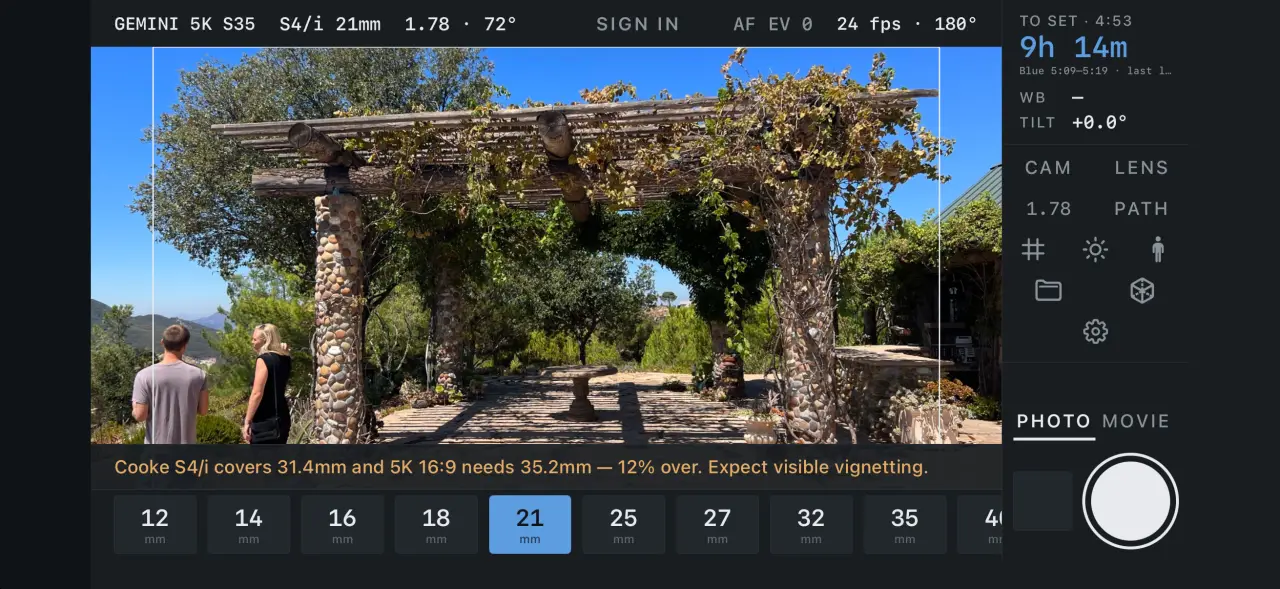
Frameline in landscape over a hillside pergola: a Gemini 5K S35 on a Cooke S4/i 21mm, the 1.78 framelines drawn on the picture, 9 hours 2 minutes to sunset in the corner, and the row of focals that set really has along the bottom.

Gemini 5K S35 · Cooke S4/i 21mm · 1.78 · 16:9 · 72° across

Every one of those is Frameline running, with the body, the glass and the focal it says underneath. The picture behind the lines is one scout frame held still on purpose, so the only thing moving is the frame you picked.
What else is on the picture.

The frame is the part you picked. Everything round it is the stuff you would otherwise be working out in your head, or in a second app.

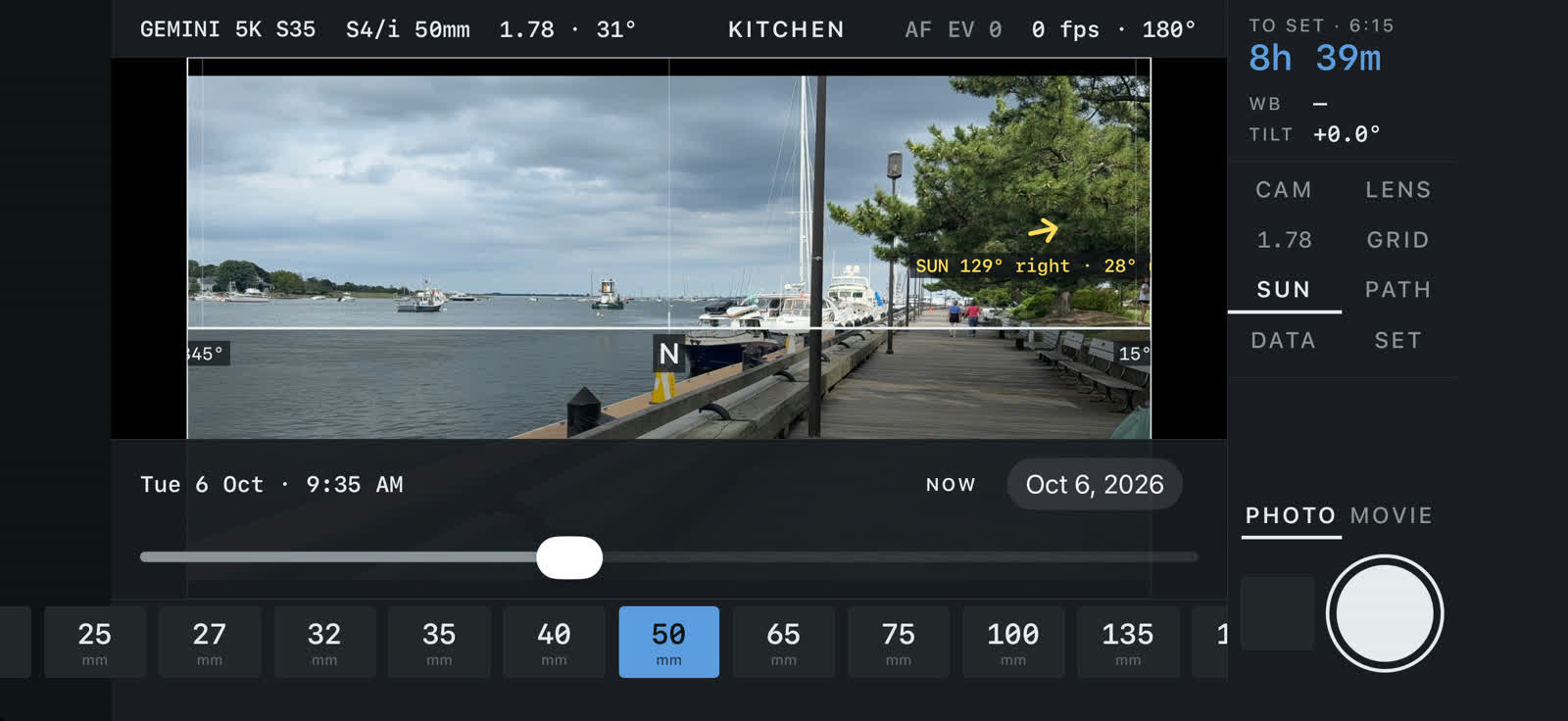
Frameline in landscape: a harbour boardwalk through a Gemini 5K S35 on a 50mm Cooke S4/i, 1.78 framelines on the picture, the sun marked at 129 degrees right and 28 up, 8 hours 39 minutes to sunset, the lens row along the bottom.
1 2 3 4
1The package. Gemini 5K S35, Cooke S4/i 50mm, 1.78, 31° horizontal. The framelines are that sensor through that glass.
2The sun, on the picture. 129° right of where you are pointing, 28° up. Not a compass rose off to one side.
38h 39m to sunset. It rolls on by itself to blue hour, then last light, then sunrise.
4The focals that set really has. Not a zoom slider pretending to be primes.

Three things you stop doing.

None of them is about framing. All of them are what actually takes the time.

Sorting the pictures

Every frame knows where it was taken and files itself under that place, called whatever the production calls it. You never make an album, never rename anything, and finding the shot of the back kitchen is one tap instead of a scroll through four hundred pictures.

Sending the pictures

One link, sent once at the top of the job. Everything you shoot after that is on it within seconds, so the director, the designer and the gaffer already have it. Nobody downloads an app, nobody makes an account, and you are not texting the same six pictures to six people.

Working out the light

The time to sunset is on the frame you are looking at and keeps counting while you work, then rolls on to blue hour and last light. One glance, no second app, and it uses the location’s time zone rather than the one your phone happens to be in.


The frames file themselves by location.

Most viewfinder apps hand back a picture with the location stripped out of it. This writes it in and then uses it: the frames from one room land together, under that room, without anybody making an album.

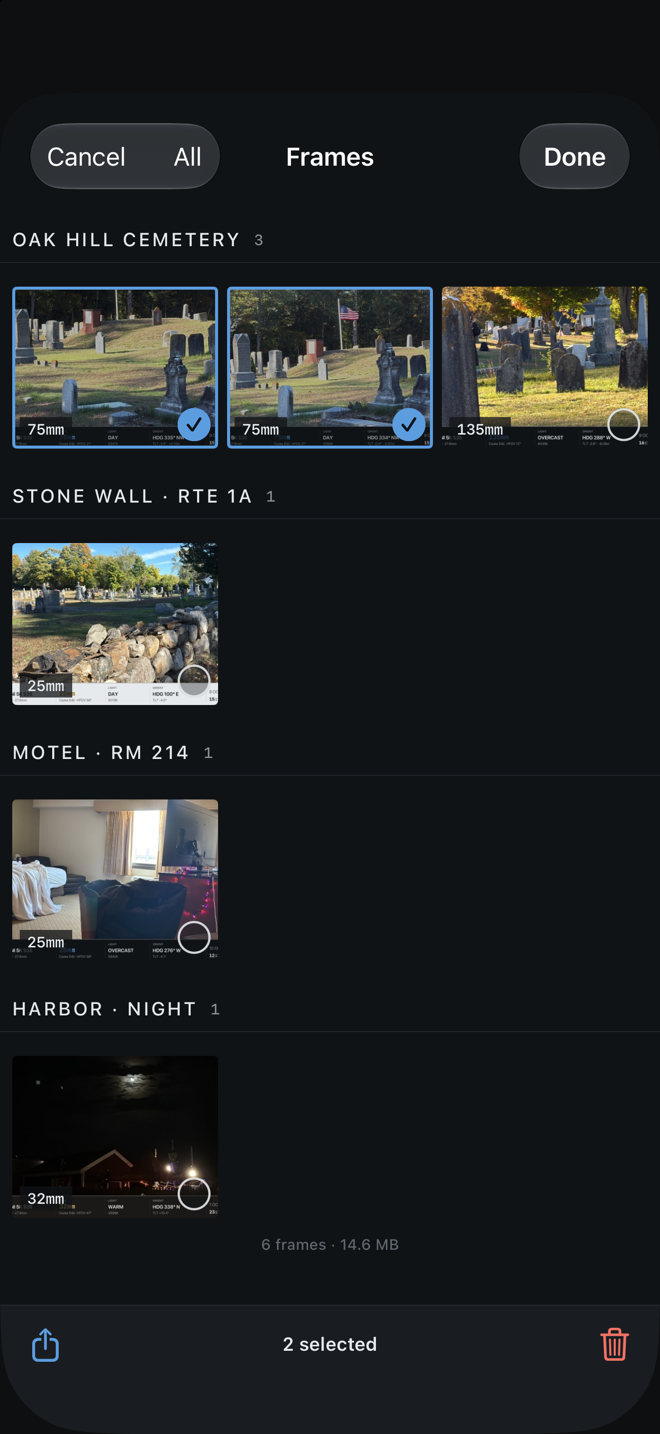
The Frameline gallery: frames grouped under Oak Hill Cemetery, Stone Wall Route 1A, Motel Room 214 and Harbor Night, each thumbnail carrying its focal length, the light and the heading, with two frames ticked and a share button at the bottom.

Six frames from one afternoon, already in four places. Nobody tagged them and nobody dragged them into anything: the phone knew where it was standing each time the shutter went.

Tick the ones you want and share them from here, or send the whole scout as one link and let it keep filling up behind you. The thumbnails keep the focal length, the light and the heading, so two takes of the same corner are tellable apart without opening either.

Written into the file

Latitude, longitude, altitude and the compass heading the camera was pointing, in the picture’s own EXIF, with the body, lens, focal and shutter angle in the comment. Open it in three weeks and it still knows.

Called what the production calls it

Rename the place from the street address to “the back kitchen” and everyone sees that. Finding it afterwards is one tap on that name.

By place, or by the day

Every frame of a place together, or everything you shot today, newest first. Two ways in, because on the day you want the room and on the drive home you want what you just shot.

Into the show folder

The same frames go into the project folder you work from, under that location, so they are there when you open the show on the Mac.

A diagram: frames taken on the phone go up to the scout page, where they group into named places, and one link goes out to the director, the gaffer and the designer.
From the shutter to the director


How long you have got.

The time to sunset sits on the viewfinder while you work and keeps counting. When the sun goes it becomes the blue hour, then last light, then the time to sunrise.

The light
—
Working it out where you are.

That number is live, and it is for wherever you are reading this: the page takes the time zone your computer is in and works the light out there, the way Frameline works it out wherever you are standing. On the phone it sits in the corner of the frame while you line up a shot, so you never put the camera down to go and look it up.

Eleven times, not two

Astronomical dawn, nautical dawn, civil dawn, sunrise, golden hour ends, solar noon, golden hour starts, sunset, civil dusk, nautical dusk, astronomical dusk. Nobody else puts the countdown on the picture itself.

The location’s time zone, not your phone’s

Planning a Massachusetts location from California puts every time three hours out if you use the device. Every place carries its own zone, and the app says which one it used.

Correct to the minute

Sunset is at −0.833°, not the flat horizon: three minutes on its own. Elevation moves it again, four minutes at 800m. Both are in the maths here.

A sun map to hand over

The whole day for that location, over the satellite picture of it, as a PDF out of the share sheet. The gaffer gets the same page you have.

Frameline's sun page: the place and its time zone, the day's arc, and the printable sun map drawn over a satellite picture of the location with sunrise and sunset bearings.
Beauport, Gloucester · its own zone · the sun map, printed over the location

And it is already in Sightline.

Point the phone at the show folder once. After that a frame you take at the location is in the project a few seconds later, filed under that place, and it is there when you sit down at the Mac to plan the scene. Nobody AirDrops anything and nobody renames a folder.

One folder, both apps

Google Drive, iCloud, Dropbox or a disk. Sightline works inside it and what the phone sends lands in it, under the right location.

The same cameras and glass

37 bodies, 77 recording modes, 40 lens sets, 419 focal lengths. A 32 on the scout is the 32 on the plan, because both read the same tables.

The same sun, to the second

One solar engine, in both apps. The sunset the phone counts down to is the sunset the plan draws across the set.

Return to this frame

On the day, pick the scout still: the viewfinder ghosts it over the live picture and tells you WALK 14 m NE, TURN 12°, TILT 3° until it reads ON FRAME, and when the sun is back where it was.

See Sightline

Or just use it as a viewfinder.

If all you want is what Artemis or Cadrage give you, that is all it has to be: pick the body and its recording mode, pick the lens set in the case, hold it up. Nothing gets filed, nothing gets shared, and the rest of the page is there on the day you want it. The picture behind the framelines is the phone’s own camera, not a screenshot of a preview.

37
camera bodies

ARRI, RED, Sony, Canon, Panasonic, Blackmagic, Fujifilm, Nikon, Phantom, and ten film formats.

77
recording modes

The gate each body actually records, not one sensor size per camera.

40
lens sets

Seventeen makers: Cooke, ARRI, ZEISS, Angenieux, Panavision, Hawk, Leitz.

419
focal lengths

The focals each set really has, so a 32 is that set’s 32.

It holds steady in an interior

Most viewfinders look fine outside and stutter at dusk, exactly when you are scouting, because iOS lets the frame rate sag as the light drops. Here it is pinned and gain takes the hit instead.

The blur is the blur you will get

180° at 24fps is 1/48s and the preview is capped there, so a pan that strobes in the viewfinder strobes on the day. 45° to 360°, and it flags 172.8° as the flicker-free angle at 24 under 50Hz.

Stabilisation off by default

Every mode except off crops and shifts the frame. A viewfinder that quietly changes your field of view is worse than none.

Stills and clips

The phone’s real photo output, with the frame burned in if you want it, not a grab of the screen.

Get it on the App Store How Frameline works

Josh beside the camera on a roadside exterior, watching the monitor between setups.
Who makes this

Josh Maas, a director of photography in Los Angeles, ICG Local 600. More than forty features in fifteen years. Frameline is the phone half of how he preps: the bodies and lens sets are the same ones Sightline draws with, and a frame taken standing in the room files itself into the project under the place it was taken, with the lens and the light still written on it. Scouting and planning stopped being two jobs.

ICG Local 600  ·  Los Angeles  ·  40+ features  ·  joshmaas.com